PivotEQ | Maximize Commercial Card Program Value
PivotEQ helps Concur Expense customers manage the accounting associated with company paid cardsStop Reconciling Credit Cards Manually
Start Saving Hours Each Month
Say Goodbye to Manual Credit Card Reconciliation
Tired of spending hours matching up credit card statements at the end of the month or when it’s time to pay the bill? PivotEQ takes care of it for you — automatically reconciling statements from any card issuer and any type of credit card, while getting your accounting ready in the background.
Here are just a few of the card types PivotEQ works with:
• Business Card
• Corporate Card
• Travel & Entertainment (T&E) Card
• Purchasing Card (P-Card)
• Fleet Card
• Ghost, Lodge, or Central Billed Account (CBA)
• Prepaid Card
• Virtual Card
…and plenty more.
Sound Familiar?
1 Manually Compare Credit Card Statements to Expense Reports
2 Identify Transactions Missing from Expense Reports
3 Contact Cardholders Requesting They Submit an Expense Report
4 Repeat the Process As Expense Reports Arrive
5 All Too Often End the Month with Large Number of Accruals


Let’s Talk Automated Reconciliation with PivotEQ & Smart Accounting
1 Compares Card Statement to Expense Reports.
2 Notifies Employees with Outstanding Card Purchases.
3 Continues Comparison as Expenses Reports Arrive.
4 Determines the Correct Accounts for Accruals with Smart Accounting
5 Creates Accounting Entries & Correcting Entries.
Want to Read Up on Smart Accounting?
DEMONSTRATION

Success Story
Webinars
Your content
See PivotEQ Reminders in Action
Expense reporting doesn’t usually fail because people don’t care — it fails because people are busy. PivotEQ’s reminders are designed to meet cardholders where they are, with the right message at the right time.
Here are three examples of pre-written PivotEQ reminder emails. Customers can use these as-is, edit them to match their voice, or create entirely custom reminders. PivotEQ also gives you full control over when reminders are sent — for example, one week before your accounting deadline or on a specific day of the week that works best for your team.
goes here. Edit or remove this text inline or in the module Content settings. You can also style every aspect of this content in the module Design settings and even apply custom CSS to this text in the module Advanced settings.
See PivotEQ Reminders in Action
Expense reporting doesn’t usually fail because people don’t care — it fails because people are busy. PivotEQ’s reminders are designed to meet cardholders where they are, with the right message at the right time.
Below are three examples of pre-written PivotEQ reminder emails. Customers can use these as-is, edit them to match their voice, or create entirely custom reminders. PivotEQ also gives you full control over when reminders are sent — for example, one week before your accounting deadline or on a specific day of the week that works best for your team.
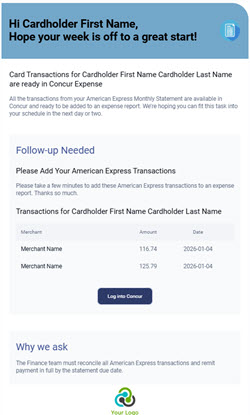
1. Friendly Heads-Up
Sent right after the credit card statement closes, this message is intentionally low-pressure. It simply lets cardholders know their transactions are ready to review — no scolding, no urgency, and no assumptions. Think: “You’re not in trouble — just a heads-up.”